2026.7.31 Product Update
Added CRM customer information management, bot knowledge base categories, transfer back to bot, workspace lead capture, conversation list visitor info display, and App/workspace improvements.
In this update, we upgraded customer profile management, AI bot reception, channel welcome messages, lead capture, conversation list display, and client-side experience.
The main additions include CRM customer information management, bot knowledge base categories, transferring conversations back to the bot, and lead capture directly from the workspace. These improvements help teams manage visitor profiles, collect sales leads, and improve daily customer service efficiency.
New Features
- Added CRM customer information management
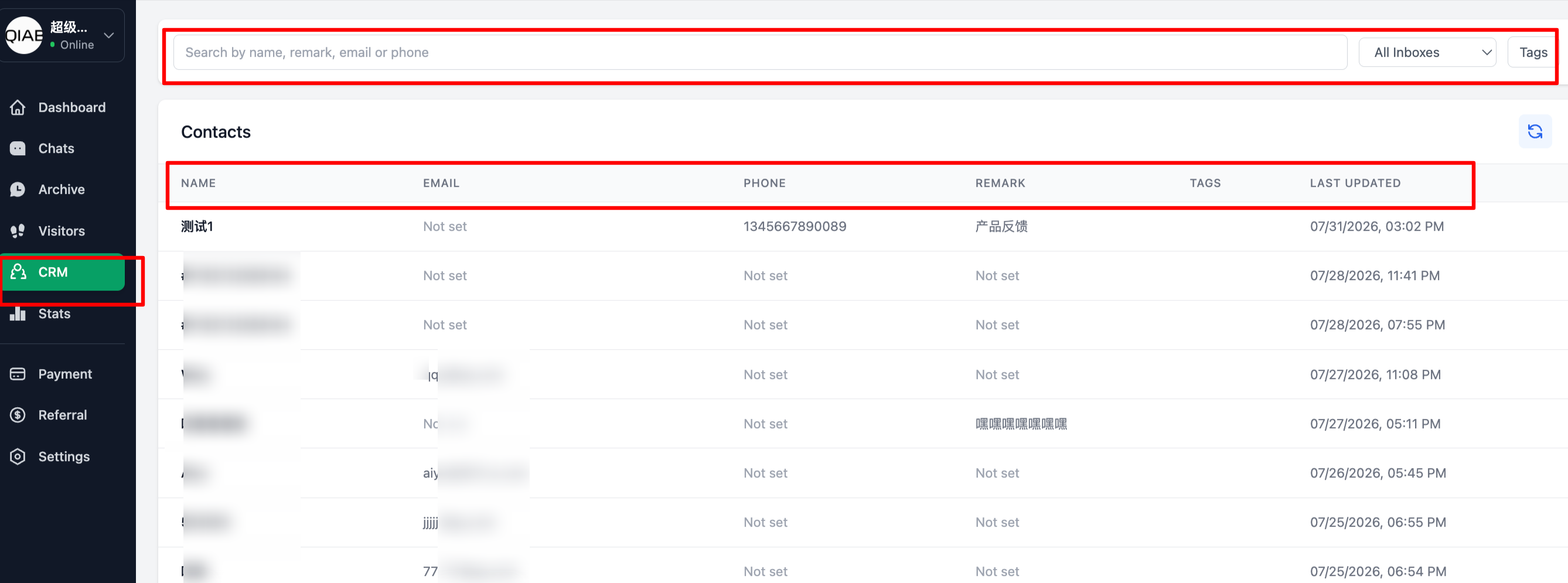
You can now enter CRM from the left-side menu to manage customer information in one place.
In CRM, you can search visitor names, notes, emails, phone numbers, and other visitor information, making it easier to follow up, manage operations, and look up customer profiles later.
For teams with a large number of inquiries, a visitor should not disappear after a single conversation. With CRM, agents and operators can better retain visitor profiles and turn conversations into customer information that can be followed up later.
- Bot knowledge base now supports categories
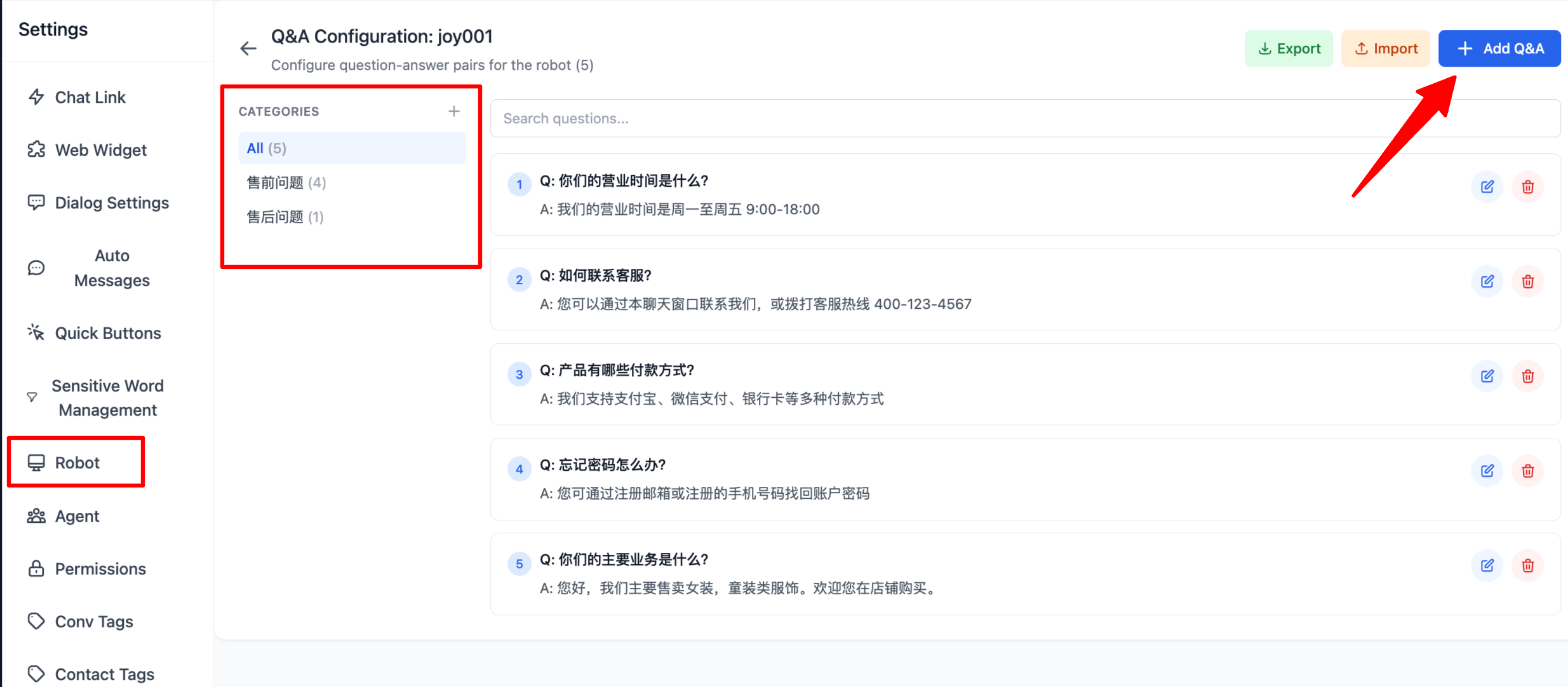
The bot knowledge base now supports category management.
Path: go to Settings - Bot - Knowledge Base - Add Q&A. When adding a Q&A entry, you can select a category.
As the knowledge base grows, putting all Q&A entries in one place makes maintenance harder. With categories, you can organize content by registration, top-up, plans, operation guides, common issues, and other topics, making bot content clearer and easier to optimize over time.
- Conversations can be transferred back to the bot
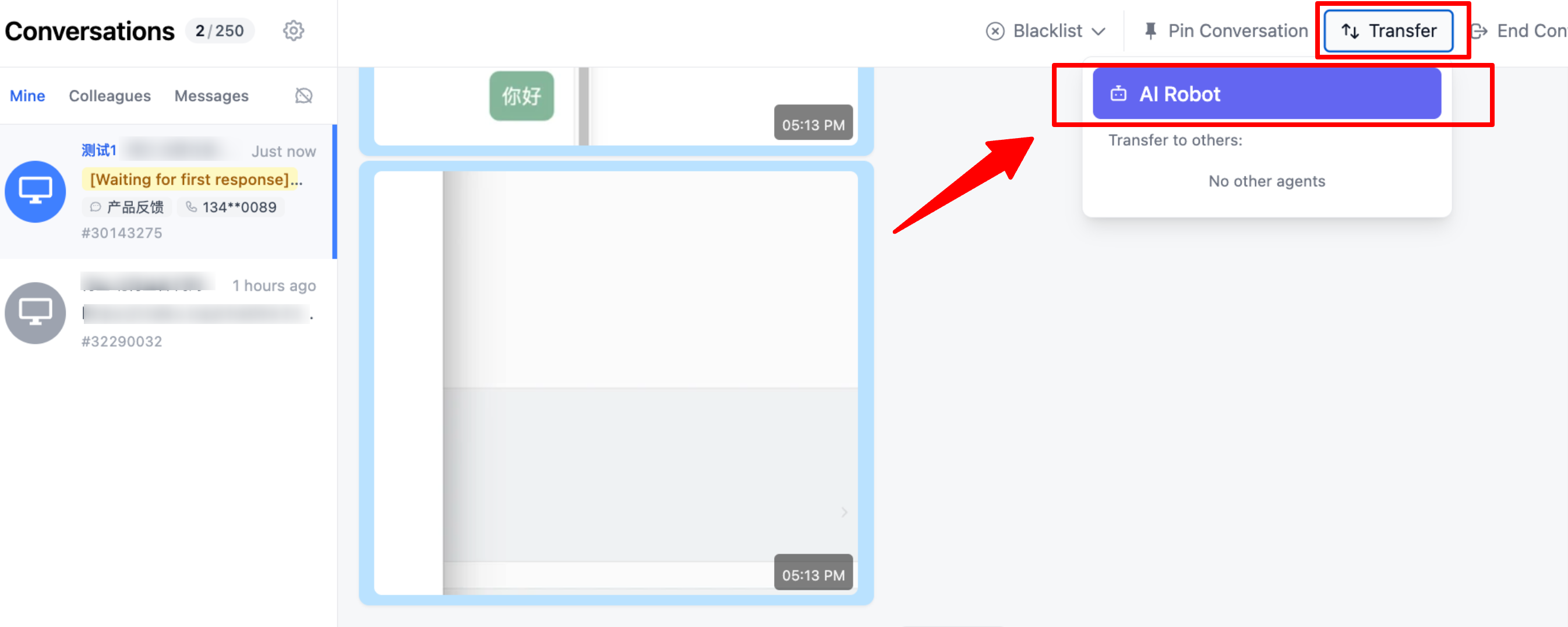
Conversations can now be transferred back to the bot during an active chat.
When a human agent is temporarily unable to continue handling a visitor, or when the current question is better handled by the bot using the knowledge base, the conversation can be handed back to the bot.
Path: first enable Bot First Reception under Settings - Chat Links. Then, in Conversations, you can transfer the current conversation to the bot.
This feature is useful for high-inquiry teams that need to switch flexibly between human agents and AI. The bot can continue handling standard questions, while human agents can focus on more complex conversations that require judgment.
- Channel welcome messages now support custom trigger logic
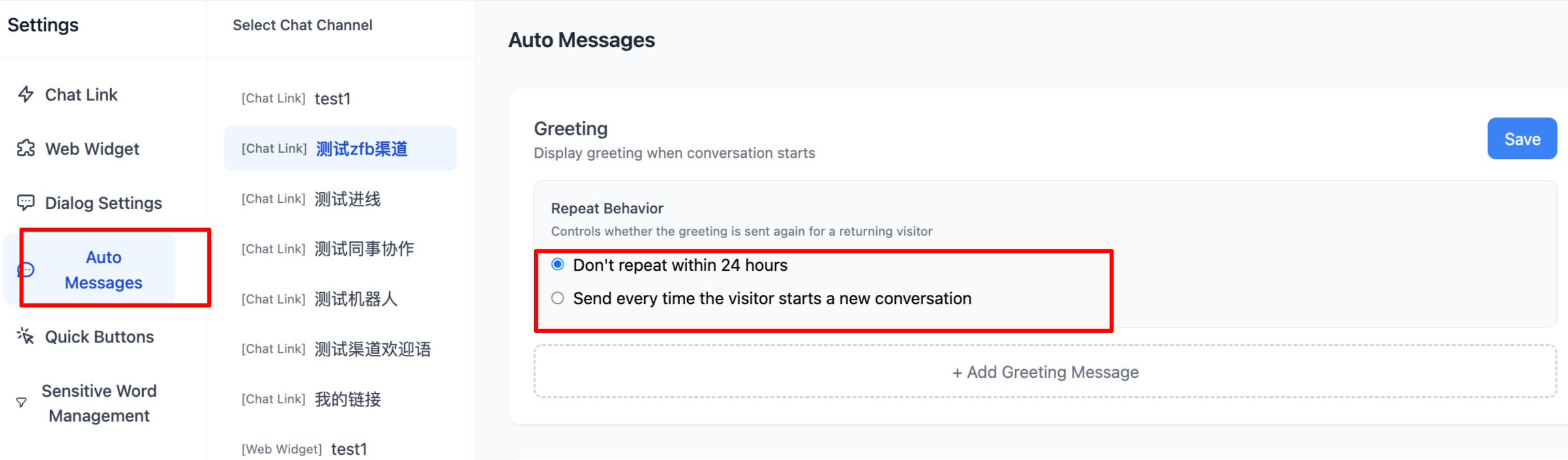
Channel welcome messages now support custom trigger logic.
You can choose not to resend channel welcome messages within 24 hours, reducing unnecessary disturbance to visitors.
Path: go to Settings - Automatic Messages - Welcome Message, choose the trigger mode you need, and save.
Welcome messages help visitors start a conversation more quickly, but repeated messages can affect the experience. With this optimization, teams can control welcome message frequency more flexibly and make visitor reception feel more natural.
- Lead capture is now supported in the workspace
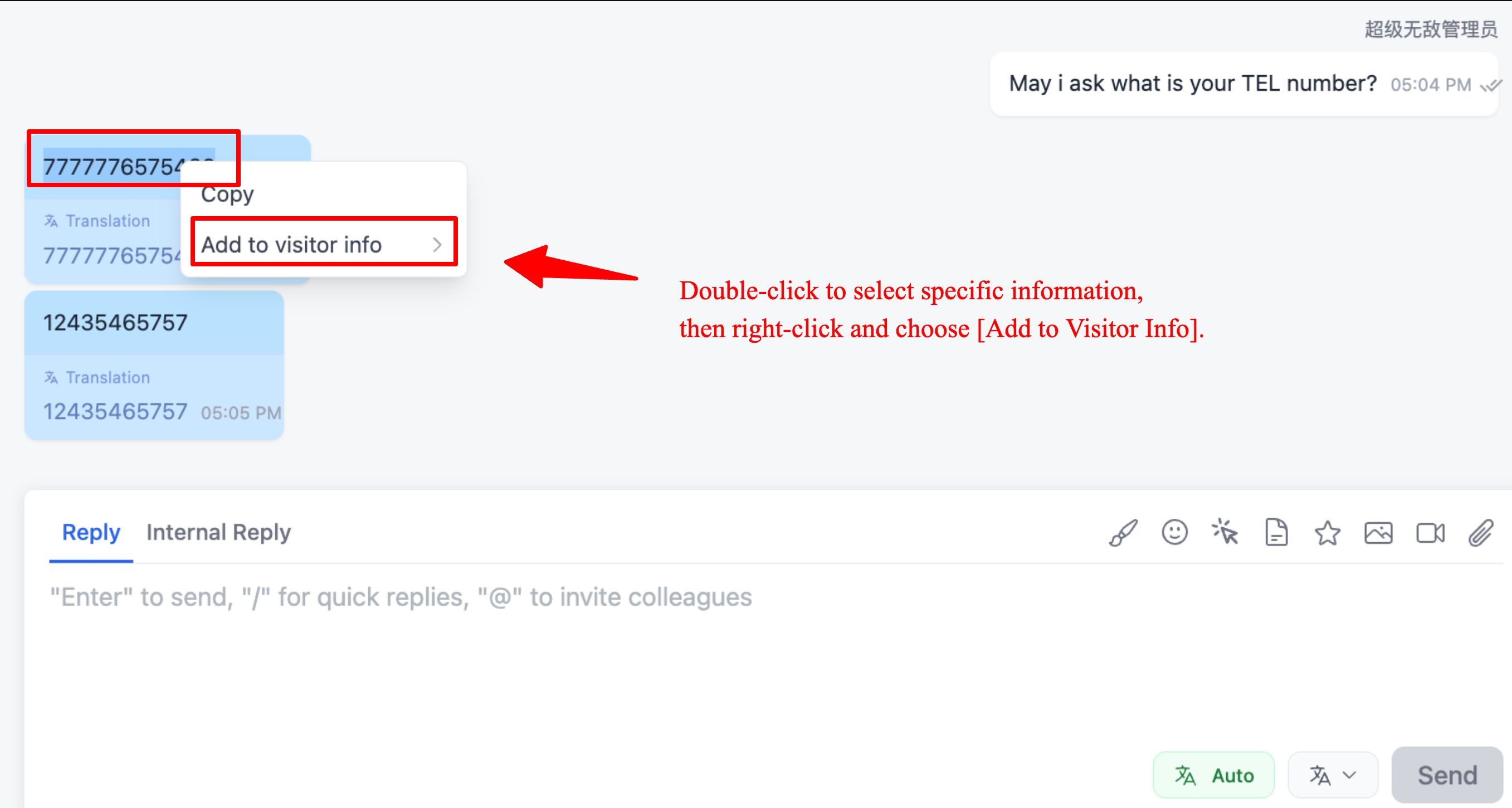
Agents can now capture customer leads directly from the workspace.
When visitors send an email, phone number, or other contact information in a conversation, agents can select the content and right-click to add it to the visitor profile.
Captured leads can be added to visitor profiles and the CRM system, making later management and follow-up easier.
This reduces the need for manual copying and manual data organization, while lowering the risk of missing important contact information.
- Conversation list now supports visitor information display
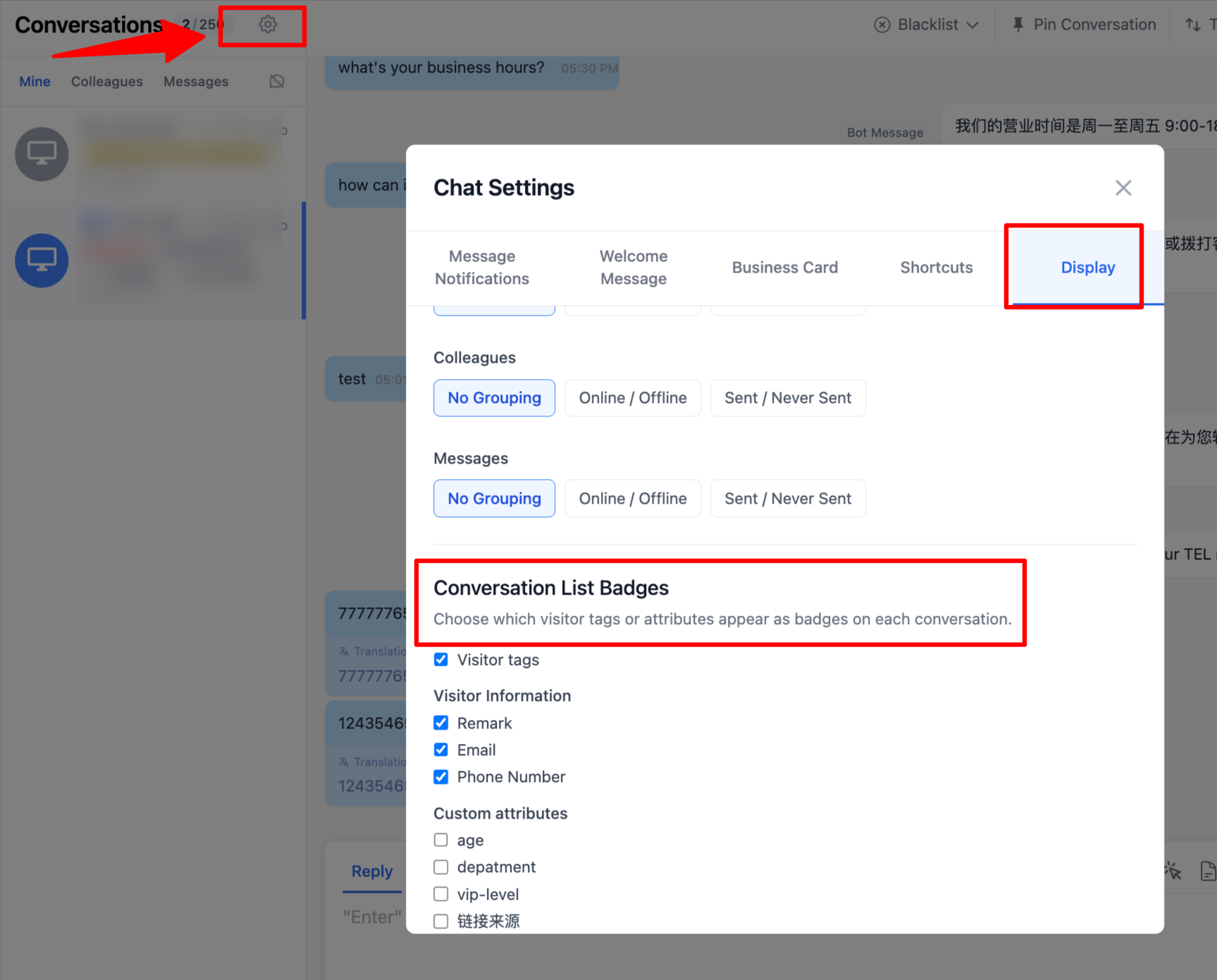
The conversation list can now display more visitor information.
Path: go to Conversation Page Settings - Page Settings - Conversation List Badges, then select the information you want to display.
After setup, agents can view visitor information directly in the conversation list, without frequently opening the detail panel. This helps agents judge conversation priority faster.
- Client now supports one-click cache clearing
The new client now supports one-click cache clearing.
How to clear cache: open the client, click File in the upper-left corner, and select Clear All Cache.
If the client shows abnormal pages, old data does not refresh, or some resources fail to load, you can first try clearing the cache. This reduces the need for repeated installation or repeated troubleshooting.
New client download link:
https://links.qiabot.com/next/qiabot-next-0.5.1-x64.exe
App Experience Improvements
This update also includes several App experience improvements:
- Support blocking visitors or IPs in sub-conversations;
- Fixed the issue where attachments could not be clicked;
- Fixed visitor online status display issues;
- Optimized the number of quick replies displayed;
- Fixed the issue where quick replies did not support Chinese search.
These improvements focus on daily mobile reception scenarios, helping agents handle conversations, view attachments, search quick replies, and manage abnormal visitors more easily in the App.
Workspace Reception Improvements
We also fixed and optimized several workspace details:
- Fixed the scrollbar issue in the FAQ editing panel;
- Optimized image rendering logic, so screenshot attachments can render normally as images;
- Optimized conversation image viewing, allowing agents to switch directly between previous and next images;
- Fixed conversation tag color display issues;
- Fixed occasional white screen issues during login for some accounts;
- Fixed visitor online status display issues.
These fixes make it more stable for agents to view images, edit FAQs, use tags, log in to the workspace, and judge visitor status.
Summary
The July 31 update focuses on five main areas:
- Customer management: added CRM, with visitor profile search and management;
- AI reception: knowledge base categories and transfer back to bot;
- Lead capture: capture emails, phone numbers, and other leads directly from the workspace;
- Reception efficiency: show more visitor information in the conversation list and improve App quick reply experience;
- Stability fixes: improved attachments, images, tags, white screen issues, and online status display.
We will continue improving customer service efficiency, customer profile management, AI bot collaboration, and multi-device experience.